






Dismiss Cookie Bar II is our new Cookie Bar release and has been fully rewritten from the ground up as a Module. This decision was made in an attempt to leave some plugin conflicts and to give the module a wider range of configurability. This is the same Cookie banner you see on our Website.
Each and every aspect of this extension is fully configurable to give you the ability of having exactly what you want in a simple cookie banner. We also decided to add some animations to help it to be noticed.
Options:
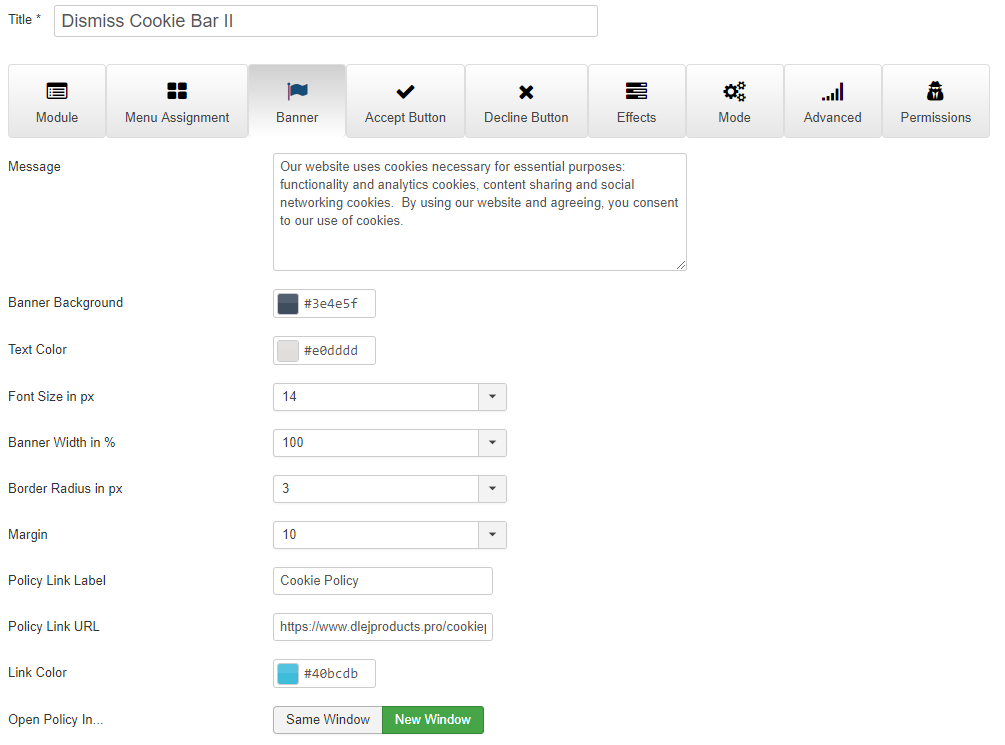
Banner:
Banner Message is all your own. Fully HTML Compliant
Banner Background
Banner Text Color
Font Size
Banner Width
Border Radius
Margin - Top margin if set it top position / Bottom margin if set in bottom position. Lets you set it to be almost anywhere in your browser window.
Cookie Policy Link Label
Cookie Policy Link URL
Cookie Policy Link Color
Open the policy in a new browser window or the same window.
Privacy Link Label
Privacy Link URL
Uses the same link settings as the Cookie Policy (link color, browser window).
Button:
Button Background
Button Text
Button Text Color
Button Border Radius
Button Align Left | Center | Right
Decline Button:
Option to disable the button
Button Background
Button Text
Button Text Color
Uses the same radius and alignment as the accept button
Effects:
Close on Scroll
Slide In From Right
Slide In From Left
Fade In
Slide and Fade In Up/Down... depending on top or bottom position
Mode:
Banner Position - Top/Bottom
Display Cookie Banner - 1 Time (set cookie) | Always
If this is set as Always then the banner will show on every refresh of any page. This was added primarily for the admin to easily see the changes and edit according to what their preferences are
Course Download